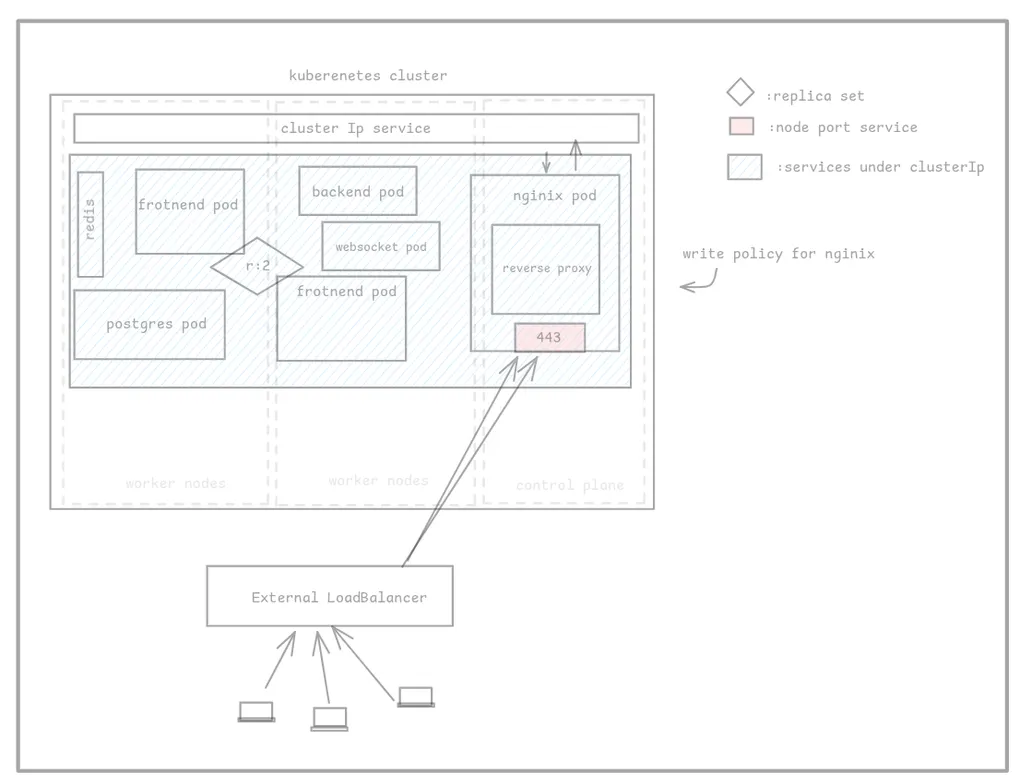
Kubernetes is not hard
Kuberenetes
for a long time i have been scared of this and i thought people who knew this are beyond human , so i decided to check it out myself in this series we explore Kuberenetes by trying things out
which is the best way to learn things i am treating this blog as my writeup of what i am doing to get the containers talking to each other and working
simulating the setup
as you all know i am not rich , and i cant afford to pay for the stupid cluster pricing and i’d make mistakes and end up not being avble to get anything done so this is my solution
we are using kind , kubectl , docker for everythign our first approach is to use kind to spin up docker containers
prerequisites we need docker docker-compose kubectl which you can install using pacman
i am also using kind which is a package i got from yay
understanding the vision
kuberenetes cluster is a collection of nodes (computers that operates as a single resource) if u have n nodes 1 node of them usually is the control plane you can think of this is the orchestrator of the rest of the nodes aka master node there can be one or more control plane but usually its just one
lets now create a 3 node cluster one node is the control plane others are worker nodes
[ [[ node A ]] [ node B ] [ node C ] ]node A is our control plane
control plane also exposes the api server and secrets which our system’s kubectl uses to control
the cluster kubectl is the command line tool used to interact with kuberenetes cluster
lets understand the basis of all kuberenetes nodes that is the controller controller is a loop that is endlessly going on checking if smthn is going on for example our control plane has some controllers used to check how things are going on in other nodes and see if anything is going wrong
kuberenetes cluster is self healing in nature implying that if u delete any worker node control plane would spin it back up , its entirely fault tolerant cool now what is the next layer of abstraction
pods
pods are like containers that are ethreal they are a wrapper over containers technically and can be run in any node these pods can run docker containers specifically containers of images hosted in dockerhub or ECR even private ones if you provide secrets
[ [[ node A]] [ (pod 1) B ] [ (pod 2) C]] we have spun up 2 pods pods are ethreal they are not spun up again when one pod goes down but containers running inside pods can be spun back up by the pod
pods allows for shared networking and stuff between contianers
replica set
replica set is used to spin up pods with a count specified these things manage pods of same image as evidenet from the name replica basically like a manager of a pod and ensures that there are always X no of pods nothing less or nothing more than X
when the count drops beyond this it spins it back up
[ [ {replica set: 2}->{(pod 1) (pod 1)} ] ] we have this replcia set managing 2 instances of pod 1 at all times isnt that crazy
Deployments
deployments are used to create replica set they exist cause it makes it easier for progressive roll out of features and newer versions of the images
suppose i push something to the production branch my ci/cd pipeline would tkae it all the way and reflect the changes to create a new deployment deploymenet will create a new replicaset gradually by degrementign the count of the current replica set and slowly rollling out features
without failure
git push ~> ci cd ~> [!deployment] ~> [{old replicaset : 1}->{(pod 1) (pod 1)}]
                               |->    [{new replicaset: 1} ->{(pod 1) (pod 1)}]
when everything is fine it will reduce the count of old replicaset to 0 thus finallizing our production changes this is rolling updates it can also perform rolbacks
services
services are like networkign services etc , kuberenetes cluster is private by default implying no pods share networking but its opt in meaning u can choose to expose a pod to certain nodes and cluster by using
clusterIP service
which allows the exposure of node to the network inside the kuberenetes cluster
nodePort service
allows a port to be open to all nodes accross the kuberenetes cluster
thse are forwarded to each pod inside nodePort too
loadBalancers external load balancers or nginx csc etc can be provisioned
ingress and ingress controllers
ingres i feel like is an object its just to be watched ingres is what manages entry and exit of traffic to the cluster , network traffic can just be read by the cluster but to allow it to be read by the outer world we need to use ingress controllers
ingress controllers are used to listen to ingress objects and act as a proxy to the outer world it connects your https http services inside your cluster to the outer internet
ingress controllers are not built in by k8s we can use the ingress controllers provided by nginix
internet -> loadBalancers -> ingres controller -> service -> podsmore about the control plane
etcd - manages the state
scheduler - decides which node does what
controller - services that run forever
api server - portal to the user
in each node we have
- kubelet ( talks to control plane and orchestrates things within self)
- kubelet proxy ( makes routing possible and manages iptables for clusterIp etc)
in next blog ill be specifiying how to deploy a basic app to a cluster (locally cause i am poor)